Imagine that every time you visit a website, it has to process all the data from scratch to load images, display pages, or retrieve information. This not only increases response times but also puts additional pressure on the server and system resources. This is where caching comes into play. By storing frequently accessed data in faster memory, caching can reduce data access times and improve system performance. But how does caching work, what types of caching are there, and what challenges can arise when using it?
What Is Caching?
Caching is the process of storing frequently used data in a specific memory. Suppose you need to access a particular application or piece of data every few minutes. Since this data is frequently accessed, it is stored in a place called a cache so that it does not need to be retrieved every time you use it. There are many reasons for using caching, but one of the most important is to reduce data access time.
Hard disks have low speeds, and even the fastest ones cannot match the speed of RAM and the processor. For this reason, retrieving data from them takes time. Cache memory, however, is different because it is a type of high-speed memory. This type of memory has limited capacity and can only store frequently accessed data.
Types of Caching
In this section, we will review the different types of caching and their applications.
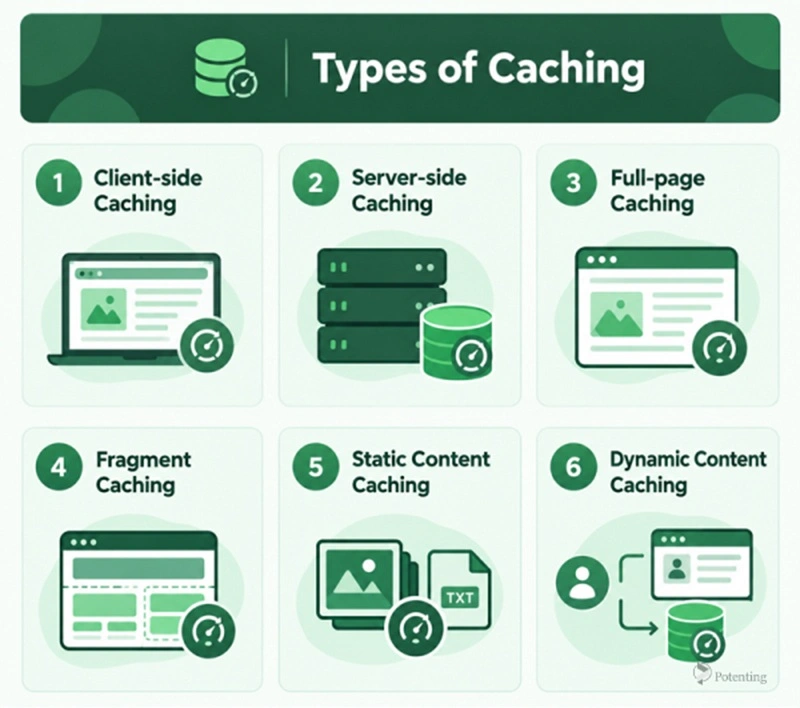
Client-side Caching
In this method, data is stored on the client side, usually in a web browser. The browser can store copies of web pages and resources such as images in its cache so that they can be displayed on subsequent visits without being retrieved from the server again. For example, by checking when a page was last modified, the browser can determine whether the cached version is still valid.Server-side Caching
In this method, data is stored on the server side to respond to requests more quickly and reduce the load on the server and network. One example is the use of a caching proxy server, which can store requested content and provide the same content to other users when needed. DynaCache in IBM WebSphere Application Server is another example of a server-side caching mechanism.Full-page Caching
In this method, a copy of the entire rendered web page is stored so that, on subsequent requests, the page can be delivered without having to execute all the content-generation processes again. However, this method is suitable only when the page content can be cached and changes to it are properly managed.Fragment Caching
In this method, specific sections of a page are cached independently instead of storing the entire page. This approach is useful when a page contains both static and dynamic content. By caching the sections that can be stored, page performance can be improved without having to cache the entire page as a single unit.Static Content Caching
This method is used to store content that changes infrequently, such as graphical images and text files. Since this content typically does not require frequent updates, storing a copy in the cache can reduce the number of requests to the origin server and decrease page load times.Dynamic Content Caching
In this method, content that may change frequently or is generated based on user information and conditions is cached. Since dynamic content may be personalized, managing cache validity and determining when it needs to be updated are particularly important. DynaCache in IBM WebSphere Application Server is an example of a solution for dynamic content caching.
Why Should You Use Caching?
As mentioned above, one of the reasons for using caching is to increase the speed of access to frequently used data. In addition, caching reduces the processing load on the server. But why?
When a system frequently needs a particular piece of data and has to retrieve it from storage, it not only takes more time but also involves additional processing by the CPU and other system resources. However, if this data is available in the cache, the system can access the cache and retrieve the data without needing to access the storage again.
Caching also offers other benefits, which are easier to understand through an example. Suppose you have 10 GB of data that needs to be stored. Since the processor is much faster than the storage system, the storage system may not be able to save this data at the same speed. This is where caching comes into play. The processor sends the data to the cache, allowing the cache to deliver it to the storage system at an appropriate rate. This enables the processor to continue working without unnecessary delays while ensuring that the data is stored correctly.
How Does Hosting Affect Website Performance?
Caching can significantly improve website performance, but it is not the only factor that determines how quickly a website loads. The hosting infrastructure also plays an important role. Server resources such as CPU, RAM, storage speed, and network performance can affect how quickly requests are processed, especially when a website experiences high traffic.
Even with an effective caching strategy, website performance may remain poor if the hosting environment cannot handle the site’s workload efficiently. Choosing a hosting service with sufficient resources and reliable performance can help reduce server response times and improve the user experience. Therefore, if you want to improve your website’s speed and performance, exploring web hosting plans that meet your site’s needs can be an effective step alongside implementing optimization techniques.
How Does Caching Work?
Caching comes in different types and is a form of storage. When data is requested, the cache is checked before the data is retrieved from the hard disk. However, since cache memory has limited capacity, not all system data can be stored in it. Therefore, the system must determine which data should be stored in the cache.
On the other hand, when the cache is full and new, frequently accessed data needs to be added, the system must decide which existing data should be removed. Various algorithms are available for this purpose, and they evaluate which data is least likely to be used again.
What Is a Cache Miss?
When an application requests different types of data, the requests are sent to the cache. If the requested data is not available in the cache, the number of cache misses increases. This means that the system has accessed the cache multiple times, but since the required data was not available, it had to retrieve it from storage.
This reduces system performance. To address this issue, the cache capacity can be increased.
What Is a RAID Controller?
A RAID controller is a hardware component in servers specifically designed to improve caching and storage performance. With the help of flash memory, its cache provides additional storage capacity and significantly improves server performance.
Challenges of Caching
- Local Cache: Storing different versions of the same data across multiple systems can lead to data inconsistencies and reduce caching efficiency.
- Cache Coherence Problem: When data changes in one cache, keeping the corresponding copies of that data synchronized across other caches becomes a challenge.
- Cache Penetration: This occurs when the requested data does not exist in either the cache or the original database. Using a Bloom filter can help reduce this problem.
- Cache Avalanche: A cache failure or the simultaneous expiration of a large number of cached items can send a massive volume of requests to the database, potentially causing disruptions. Using a cache cluster and tools such as Hystrix can help mitigate this problem.
Ultimately
Caching is an effective way to improve system performance, reduce data access times, and lower the processing load on servers. Depending on system requirements, different caching methods can be used to store frequently accessed data and deliver it more quickly. However, choosing the right caching strategy and managing cached data properly are essential to maintaining performance and preventing issues such as cache misses, cache coherence problems, and cache avalanches. Understanding how caching works, its different types, and its potential challenges helps you make better decisions when designing and optimizing systems.
FAQ
1. How do cache eviction algorithms work?
Cache eviction algorithms determine which data should be removed when the cache reaches its capacity. Algorithms such as LRU (Least Recently Used) and LFU (Least Frequently Used) select data based on how recently or how frequently it has been accessed.
Using both methods improves dedicated server security and service availability.
2. What is cache coherence, and why is it important?
Cache coherence ensures that multiple cached copies of the same data remain consistent when changes occur. It is particularly important in distributed systems and multiprocessor environments where multiple caches may store copies of the same data.