When setting up a WordPress website, design, content, and SEO often get the most attention. However, reliable web hosting is just as important.
Your hosting environment affects your website’s speed, security, stability, and ability to handle growing traffic. Choosing the right Hosting for WordPress can therefore make a significant difference to your website’s overall performance.
What Is Hosting for WordPress?
Hosting for WordPress refers to a web hosting service designed or optimized specifically for websites built with WordPress.
WordPress relies on technologies such as PHP, databases, and web servers to operate. A WordPress-focused hosting environment is typically configured to work efficiently with these requirements and may include additional tools that make managing a WordPress website easier.
This does not mean that WordPress can only run on specialized WordPress hosting. In fact, many WordPress websites run perfectly well on standard Linux hosting. The main difference usually comes down to server configuration, available features, technical support, and how much of the WordPress management process is handled by the hosting provider.
For example, some WordPress hosting plans include one-click WordPress installation, automatic backups, SSL certificates, caching systems, security tools, and WordPress-specific technical support.
Why Does Hosting Matter for a WordPress Website?
At first, hosting may seem like a simple service: you pay for a plan, upload your website, and your site goes online. The importance of hosting becomes much more obvious when your website starts receiving more visitors or when technical problems begin to affect its performance.
A suitable hosting service can contribute to:
- Faster page loading
- Better server response times
- Improved website availability
- Stronger security
- More reliable WordPress performance
- Easier website management
- Greater flexibility as your website grows
For example, an online store may work perfectly during normal traffic but become slow or unstable during a busy sales period. In such cases, the problem may not be WordPress itself. The hosting environment may simply not have enough resources to handle the increased demand.
WordPress Hosting vs. Standard Web Hosting
Technically, WordPress can run on many types of hosting. However, WordPress Hosting is specifically optimized to provide a better hosting environment for WordPress websites.
These hosting environments may include WordPress-focused server configurations, compatible PHP versions, caching systems, security features, and automated backups. Specialized support can also make it easier to manage and troubleshoot WordPress-related issues.
For this reason, if you are planning to launch or migrate a WordPress website, choosing the right Hosting can make a significant difference in your website’s performance, stability, and overall management.
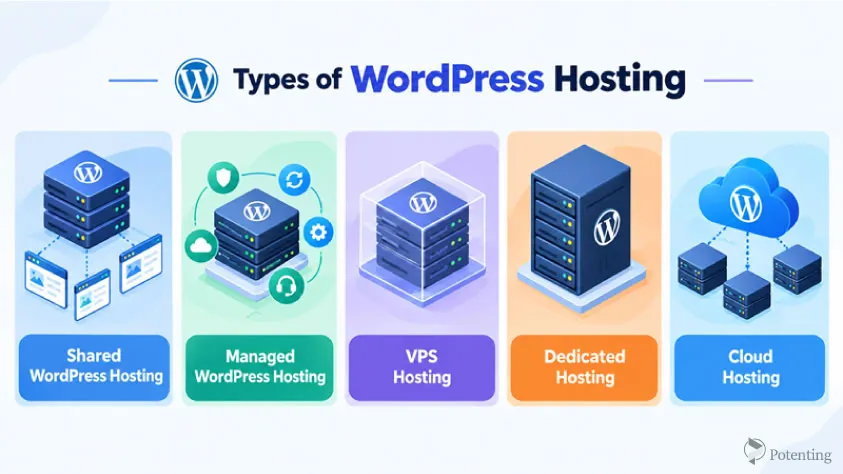
Types of WordPress Hosting
Not every website needs the same type of hosting. Your choice should depend on the size of your website, traffic levels, technical requirements, and future plans.
Shared WordPress Hosting
Shared hosting is one of the most common options for small websites and new projects. With shared hosting, multiple websites are hosted on the same physical server and share its resources. This makes the service relatively affordable and easy to manage.
For a personal blog, small business website, portfolio, or newly launched project, shared hosting can often be sufficient.
The main limitation is that resources are shared, so performance may be affected when the server becomes heavily loaded.
Managed WordPress Hosting
Managed WordPress hosting is designed for website owners who prefer to spend less time dealing with technical server management. Depending on the provider, managed hosting may include WordPress updates, security monitoring, backups, caching, performance optimization, and technical support.
This type of hosting can be particularly useful for businesses that want to focus on their website and content rather than server administration.
VPS Hosting
A Virtual Private Server, or VPS, provides more control and resources than traditional shared hosting. A VPS can be a good choice for websites with higher traffic or specific technical requirements. It also offers more flexibility when configuring the server environment.
However, managing a VPS usually requires more technical knowledge, especially if the service is unmanaged.
Dedicated Hosting
With dedicated hosting, an entire physical server is assigned to one customer. This type of hosting is generally intended for large websites, high-traffic platforms, and businesses with demanding performance or security requirements.
Dedicated servers provide extensive control and resources, but they are also more expensive and typically require more advanced server management.
Cloud Hosting
Cloud hosting uses a distributed infrastructure rather than relying on a single physical server.
Depending on the provider and architecture, cloud hosting can offer greater flexibility and scalability, making it a suitable option for websites that expect their resource requirements to change over time.
WordPress Hosting vs. Cloud Hosting
WordPress Hosting is a hosting environment specifically optimized for WordPress websites. It is designed to provide the features and server configuration needed to run WordPress efficiently.
Cloud Hosting, on the other hand, is a type of hosting that uses cloud-based infrastructure. It can also be optimized for WordPress and used in much the same way as traditional WordPress Hosting.
In other words, WordPress Hosting focuses on WordPress optimization, while Cloud Hosting focuses on the underlying hosting infrastructure.
What Should You Look for in WordPress Hosting?
Price and storage space are often the first things people look at when comparing hosting plans. However, they are far from the only factors that matter.
Performance and Speed
Website speed depends on more than just your WordPress configuration. Server hardware, storage technology, web server software, caching, database performance, and server configuration can all affect how quickly your website responds.
Modern storage technologies such as SSD and NVMe can provide better performance than older storage systems, especially when the website performs frequent database or file operations.
Reliability and Uptime
A website that is frequently unavailable can create serious problems, especially for an online business.
When evaluating a hosting provider, do not rely only on an advertised uptime percentage. It is also useful to understand the provider’s infrastructure, monitoring systems, maintenance policies, and service-level commitments.
Security
Security should be a basic requirement for any WordPress website. A good hosting environment should provide essential security features such as SSL support, server-level protection, monitoring, and regular backups.
It is also important to keep WordPress, themes, and plugins updated, since hosting alone cannot protect a website from every type of vulnerability.
Backups
Backups are one of the most valuable features a hosting provider can offer. Imagine installing a new plugin or performing an update and suddenly discovering that the website no longer works correctly. A recent backup can make it possible to restore the site without losing significant amounts of data.
Before purchasing a hosting plan, check how frequently backups are created, how long they are retained, and how easy it is to restore them.
Customer Support
The importance of technical support is often underestimated until something goes wrong.
A hosting provider with responsive support and experience with WordPress can make troubleshooting much easier. This is especially valuable for website owners who do not have extensive technical knowledge.
How Much Hosting Do You Need for WordPress?
There is no single answer because every website has different requirements. A small blog with a few hundred visitors per day may need very few resources, while an e-commerce website with thousands of products and multiple simultaneous users may require significantly more.
Resource requirements can be affected by:
- Website traffic
- Number of concurrent users
- Number of plugins
- Theme complexity
- Database size
- WooCommerce usage
- Number of products
- Dynamic requests and background processes
For this reason, it is important to look beyond storage capacity. CPU, RAM, PHP workers, database performance, and other resource limits can be just as important.
Finally: How to Choose the Right WordPress Hosting
The right hosting plan depends on the current and future needs of your website. Before making a decision, consider the type of website you operate, your current traffic, the technologies you use, and how quickly you expect your website to grow.
It is also worth asking a few practical questions:
- How much traffic does my website receive?
- Is the website an online store or a content-based website?
- Do I use WooCommerce?
- How much CPU and RAM are available?
- How are backups handled?
- Can I upgrade the hosting plan later?
- Where are the servers located?
- How responsive is customer support?
- What are the actual resource limits of the plan?
These questions can help you compare hosting services based on real requirements rather than marketing claims.
FAQ
1. When Should You Upgrade Your WordPress Hosting Plan?
You should consider upgrading when your website consistently reaches its available resource limits, experiences slower response times during periods of higher traffic, or requires more CPU, RAM, or PHP resources. Upgrading is also worth considering when your website is growing and your current hosting environment can no longer provide the performance and flexibility you need.
2. Can WordPress Hosting Handle a High-Traffic Website?
Yes, but the hosting environment must have sufficient CPU, RAM, PHP resources, and database capacity. High-traffic websites may also require scalable infrastructure, caching, and a hosting plan that can be upgraded as traffic increases.